
Leads & Sales (iSales)
Give every serious enquiry a clear next sales action
Turn an enquiry into a reviewed lead, then into a deal with an owner, a value and a stage, so salespeople know what to follow up and managers can see what is waiting.

Does this sound familiar?
Enquiries arrive from the website, by phone and on WhatsApp, but nobody can quickly see which ones deserve attention, who is following up or what should happen next. Leads & Sales (iSales) keeps each lead on the customer's record, lets a salesperson review it and convert it into a deal in one step, and runs deals on pipelines with your own stages.
What it costs the business
Good opportunities lose momentum, follow-up depends on memory, and the manager cannot see the pipeline until someone updates a spreadsheet.
Built for
- Sales directors and commercial leaders who need to see what is in the pipeline
- Salespeople who follow up enquiries and run deals
- Business owners whose pipeline still sits in a spreadsheet or in someone's memory
From problem to gain
What changes when the work moves into one place.
The situation
- Good opportunities lose momentum, follow-up depends on memory, and the manager cannot see the pipeline until someone updates a spreadsheet.
What your team does
- Leads on the customer record
- One-step conversion to a deal
- Pipelines with your own stages
What it produces
- A lead with its source attached
- An owned deal with a value, a stage and an expected close date
- A pipeline board that the manager and the team read together
What you gain
- Know where each enquiry came from
- Every opportunity has an owner and a next step
- Managers see what is waiting before it stalls
The difference it makes
Know where each enquiry came from
How
Once website enquiry capture is set up for your deployment, each enquiry arrives as a lead with its form, campaign, source and landing page, and the source stays on the lead.
Every opportunity has an owner and a next step
How
A salesperson reviews the lead in its context and converts it into a deal in one step. Each deal carries its owner, value, currency and expected close date.
Managers see what is waiting before it stalls
How
Deals move across a board on pipelines with your own stages, and the open deal value and a pipeline chart appear on the iConnect dashboard.
See it in a demonstration workspace
Real screens from a demonstration workspace with fictional data, cropped but not edited. The numbered points explain what each part does for your team.
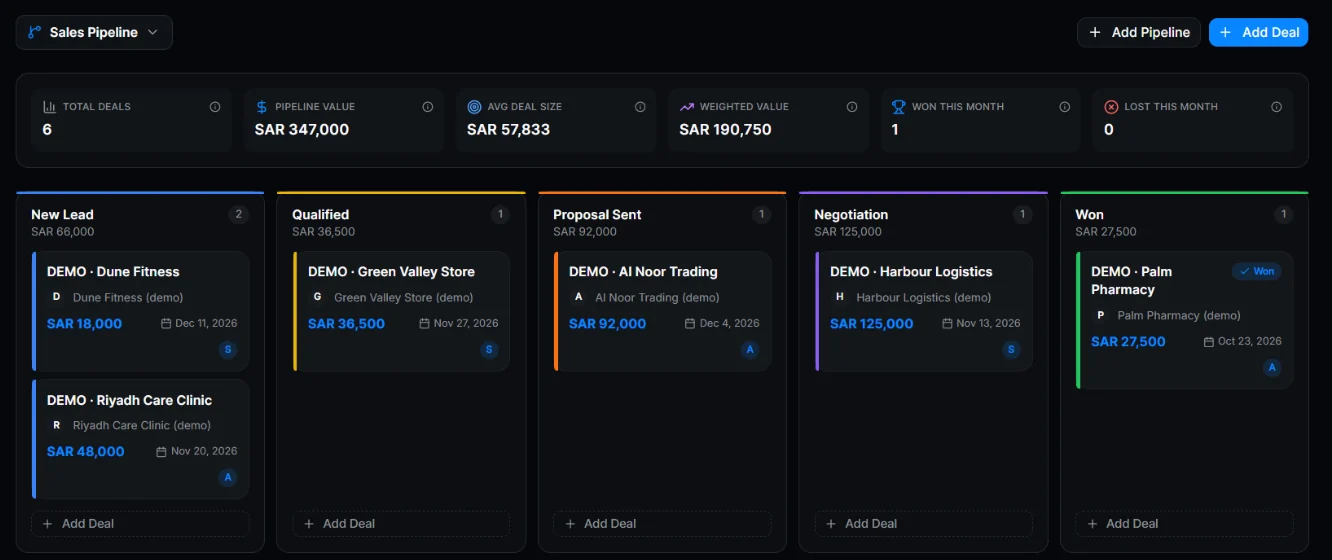
What the numbered points show
- Pipeline value, weighted value and wins in one summary row
- Every deal sits in a stage with its value, close date and owner, so follow-up has a name on it
How your team uses it
Website visitor or customer
Sends an enquiry
- Output
- A lead with its source on the customer record, once website enquiry capture is set up for your deployment
- Next owner
- Salesperson
Salesperson
Reviews the lead in its context and converts it into a deal
- Output
- A deal with an owner, a value and an expected close date
- Next owner
- The salesperson who owns the deal
Sales manager
Reviews the pipeline board stage by stage
- Output
- The deals that need attention, and who owns each one
- Next owner
- The deal owner
Inside iSales
Leads on the customer record
A lead is kept as a contact in the shared customer record, so its notes, conversations and deals stay together. A salesperson reviews each lead before converting it into a deal.
One-step conversion to a deal
Convert a reviewed lead into a deal in one step. The deal keeps the lead's source and the customer's history.
Pipelines with your own stages
Set up more than one pipeline, name your own stages and move deals across a deal board.
Deal details
Each deal records its value and currency, including Gulf currencies, its expected close date and the salesperson who owns it.
Deals linked to conversations
Keep each deal connected to the customer conversation that produced it. Conversations are handled in iConnect Inbox, which is in controlled rollout.
Website enquiry capture
Website enquiries can arrive as leads with their form, campaign, source and landing page. Capture is set up for each deployment before your team relies on it.
Pipeline view for managers
The iConnect dashboard shows open deal value and a pipeline chart, so a manager can see where deals stand and who owns them.
Illustrative example — assumed inputs, not a customer result
What one more won deal is worth in an example period
Assumed inputs
- Enquiries received
- 100
- Reviewed in context
- 60
- Qualified by a salesperson
- 20
- Assumed average deal value (SAR)
- 10,000
What the assumptions give
If 3 of the 20 qualified opportunities are won instead of 2, revenue in this example rises from 20,000 to 30,000 at the assumed deal value (SAR). That is revenue before costs, not profit. More wins are a business objective to measure, not a software result.
What a pilot would measure
Time to first meaningful follow-up, opportunities with a next action, time each deal spends in a stage, and win rate using agreed definitions and comparable periods.
How to start / What this requires
iSales runs inside iConnect, on the same login, permissions and customer records as iConnect CRM, which is in controlled rollout.
First step
Start with a tailored demoWe walk through your own workflow with you and confirm which of the requirements below apply to your team.
What needs to be in place
- Customer records in iConnect CRM, which is in controlled rollout: every lead is kept as a contact.
- A team workspace with roles for the salespeople and managers who own and review deals.
- Website enquiry capture, if you use it, set up for your deployment.
- For deals linked to conversations: iConnect Inbox, which is in controlled rollout, with a WhatsApp channel activated on your own WhatsApp Business account. WhatsApp status: Integration built; activation and verification pending.
What you gain by connecting it
Selected combinations, not every possible pair. Each connection shows how far it has been proven, so you can tell what has been shown working from what is still planned.
How to read the connection labels
- Demonstrated in testing
- Shown working in our testing, on code that is not yet released to customers.
- Configured per deployment
- Depends on setup for your deployment, such as a connected channel or approved knowledge.
- Planned
- Not built yet. Shown to explain the intended workflow.
Enquiries into owned opportunities
Once website enquiry capture is set up for your deployment, it is designed to put each enquiry on the contact with its source; a salesperson then converts it into a deal that keeps the customer's history. Handing a conversation from iConnect Inbox, in controlled rollout, straight to a sales owner is not built yet.
Works with
CRM (1)Controlled rolloutiConnect Inbox (6)Controlled rolloutSee the full workflowConnections
- Website enquiryCRM
- Contact + enquiry source
- Demonstrated in testing
- CRMiSales
- Customer history + lead to deal
- Demonstrated in testing
- iConnect InboxiSales
- Conversation handed to a sales owner
- Planned
Field visits into follow-up
iField, in controlled beta, is designed to record the visit outcome and next action on the customer record that the salesperson reads. A deal hand-off straight from the visit is not built yet.
Works with
CRM (1)Controlled rolloutiField (4)Controlled betaSee the full workflowConnections
- iFieldCRM
- Visit outcome + next action
- Demonstrated in testing
- iFieldiSales
- Visit outcome opens or moves a deal
- Planned
Coordinated growth
iEngage, on the roadmap, is designed to build consenting audiences from the customer record and pass a sales-accepted hand-off to the deal owner.
Works with
CRM (1)Controlled rolloutiEngage (3)RoadmapSee the full workflowConnections
- iEngageiSales
- Sales-accepted hand-off
- Demonstrated in testing
- CRMiEngage
- Eligible, consenting audience
- Demonstrated in testing
Suggested solutions
Complete workflows this product takes part in.
- Every enquiry becomes an opportunity with an owner and a next stepKeep the enquiry source, the customer's context and the next sales action together, so follow-up has an owner instead of depending on who saw the message first.
- Every visit ends in a recorded outcome and a clear next actionCarry what happened at the customer's site into the customer record and the manager's view, with less repeated reporting and fewer calls chasing updates.
- Research, nurturing and sales work from the same prospects, with a clear owner at each stepReduce repeated preparation and clarify responsibility between research, permitted nurturing and sales, routed through the shared customer record.
Related pages
- CRM (1)Controlled rollout
- iConnect Inbox (6)Controlled rollout
- iField (4)Controlled beta
- iEngage (3)Roadmap
Good to know
We would rather you knew the current limits before a demo than after it.
- Controlled rollout: request a demo to discuss access.
- Website enquiry capture is set up per deployment. It is not running until that set-up is done.
- Lead stages and follow-up dates are planned. Lead scoring, forecasting and sales quotas are not part of iSales.
- A person qualifies every lead and decides the next step. Leads are not qualified by the software.
- Field visits do not open or move deals. That hand-off is planned.
- Deal-linked conversations depend on a WhatsApp channel, whose status is Integration built; activation and verification pending.
- It is a web app that runs in the browser. There is no native mobile app.
Technical details
For technical evaluators: records, roles, inputs and setup, as far as current evidence supports them.
Show the technical details
- Records
- Leads are contacts in the shared customer record. Deals belong to pipelines and link to their contact and conversation.
- Deal fields
- Value, currency including Gulf currencies, expected close date, owner and stage.
- Lead source
- Form, campaign, source and landing page, captured from website enquiries once capture is set up for the deployment.
- Roles
- Deals are worked within the iConnect account roles: owner, admin, agent and viewer.
Questions and answers
What is Leads & Sales (iSales)?
Leads & Sales (iSales) is the leads and deals part of iConnect, built by iConsultants. It turns an enquiry into a reviewed lead and then into a deal with an owner, a value and a stage, on pipelines with your own stages.
Does it capture website enquiries by itself?
Website enquiries can arrive as leads with their source once capture is set up for your deployment. It is not running until then, and a salesperson still reviews each lead.
How is it different from the customer record?
iConnect CRM, which is in controlled rollout, keeps the customer record: contacts, history and notes. Leads & Sales (iSales) runs leads and deals on that same record, so a deal never loses its customer's context.
How does it work with marketing?
iEngage, which is on the roadmap, is designed to nurture an eligible, consenting audience and prepare its engagement context for sales. In Leads & Sales (iSales) a salesperson accepts and manages the opportunity. Engagement scoring does not replace human qualification.
Can I start using it today?
Leads & Sales (iSales) is in controlled rollout. Request a demo and we will show you the pipeline and talk through access and whether it suits your team.
Request a demo
Tell us how enquiries reach your sales team today and where follow-up slips. We will reply to arrange a walkthrough.