
Shared Inbox (iConnect Inbox)
Keep customer conversations moving when people change
Bring customer conversations into one team inbox where each one has an owner, a status and the customer's record alongside, so a colleague can take over without asking the customer to start again.

Does this sound familiar?
Customer messages sit on one person's phone or in a private mailbox. When that person is busy, on leave or leaves the company, nobody else can see what was asked, what was promised or who should reply next.
What it costs the business
Replies slow down, customers repeat their story to each new person, and the history of the relationship leaves with the employee.
Built for
- Customer service directors who need every conversation to belong to the company, not to one phone
- Business owners whose customers message individual staff today
- Team leads who assign conversations and cover absences
From problem to gain
What changes when the work moves into one place.
The situation
- Replies slow down, customers repeat their story to each new person, and the history of the relationship leaves with the employee.
What your team does
- Ownership and status on every conversation
- The customer's record beside the thread
- Templates, quick replies and internal notes
What it produces
- An owned conversation with a clear status
- A traceable handover the next owner can read
- A conversation kept on the customer's record, not on one person's phone
What you gain
- Any colleague can pick up a conversation with its history
- Everyone can see who acts next
- Fewer duplicate contacts and repeated messages to untangle
The difference it makes
Any colleague can pick up a conversation with its history
How
Each conversation keeps its thread, notes and status in one team view, linked to the customer's contact record.
Everyone can see who acts next
How
Every conversation has an assigned owner and an open, pending or closed status, and unread conversations stand out in the list.
Fewer duplicate contacts and repeated messages to untangle
How
Incoming messages are matched to a contact by phone number, never by display name, and a duplicate message is stored once.
See it in a demonstration workspace
Real screens from a demonstration workspace with fictional data, cropped but not edited. The numbered points explain what each part does for your team.
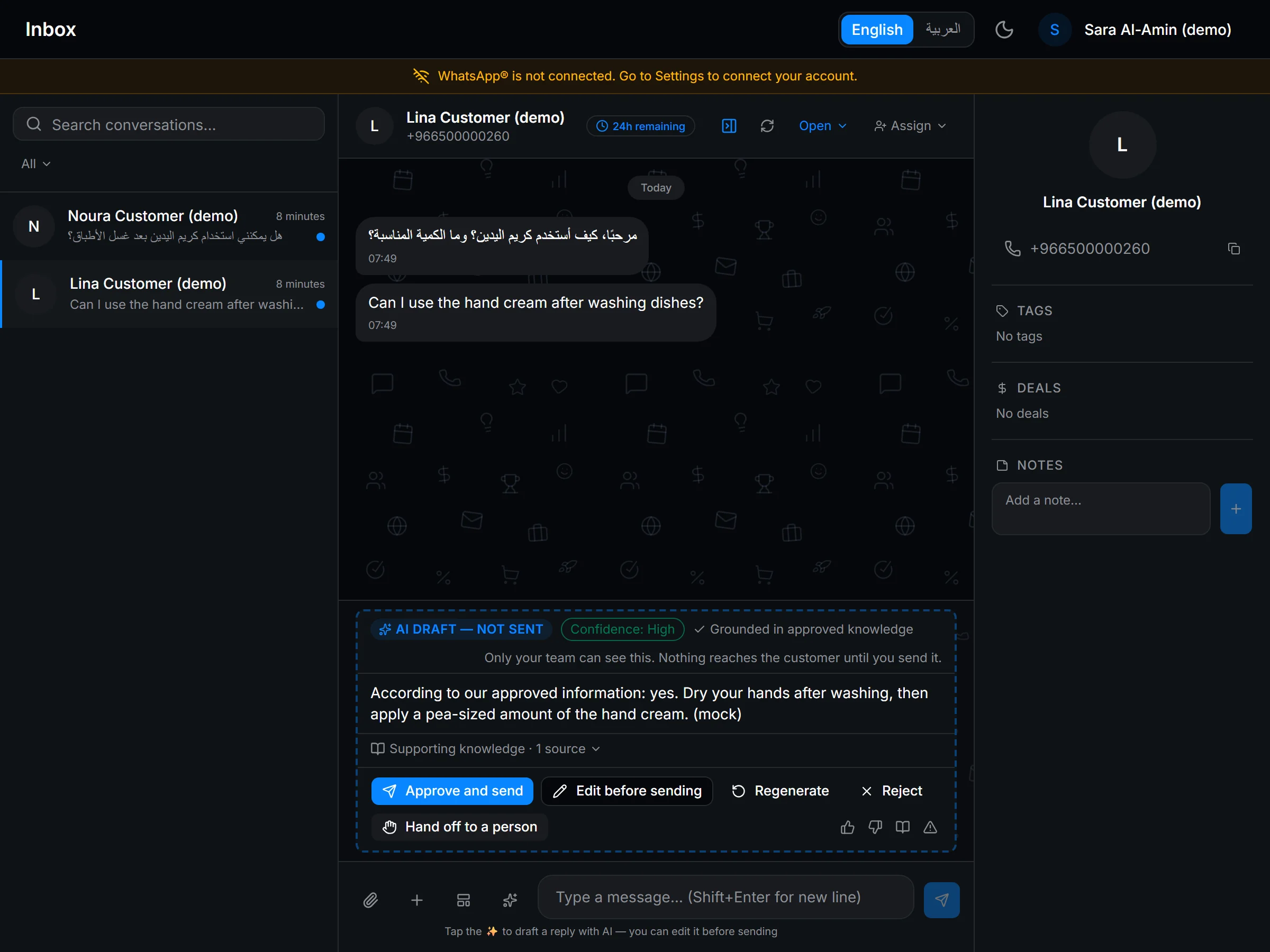
What the numbered points show
- Every conversation has a status and an owner, so nothing waits unnoticed
- The customer's record beside the thread: no switching screens
- AI drafts stay internal until a person approves (simulated reply in this demo)
- WhatsApp is not connected in this demonstration workspace
How your team uses it
Team lead
Assigns a new conversation to a team member
- Output
- A conversation with a named owner and an open status
- Next owner
- The assigned team member
Team member
Replies with a template or quick reply and adds a note for colleagues
- Output
- A thread with its context recorded beside it
- Next owner
- Whoever covers the customer next
Colleague covering an absence
Opens the conversation and the customer's record together
- Output
- A reply that continues the conversation instead of restarting it
- Next owner
- The customer, who does not have to repeat the story
Inside iConnect Inbox
Ownership and status on every conversation
Assign each conversation to a team member and set it to open, pending or closed. The list shows who owns what and which conversations are still unread.
The customer's record beside the thread
Each conversation is linked to its contact, so the person replying sees the customer's tags, notes and deals from iConnect CRM, which is in controlled rollout.
Templates, quick replies and internal notes
Answer with the message templates and quick replies your team has agreed, and leave notes for colleagues that the customer never sees.
Matching by phone number
Incoming messages are matched to a contact by phone number, never by display name, so two customers who share a name are kept apart.
A traceable history through every handover
An audit history records assignments and changes, so a handover can be traced and the next owner sees what happened before.
Reply drafts for a person to review
With iSupport AI, which is in controlled rollout, a suggested reply drawn from your approved knowledge appears in the conversation for a team member to review. Nothing is sent until a person approves it.
How to start / What this requires
iConnect Inbox works inside iConnect, on the same login, permissions and contact records as iConnect CRM, which is in controlled rollout. It needs a channel activated for your company.
First step
Start with a tailored demoWe walk through your own workflow with you and confirm which of the requirements below apply to your team.
What needs to be in place
- A team workspace with roles, shared with iConnect CRM (Controlled rollout): the same contacts and the same permissions.
- A channel activated and verified for your company. WhatsApp is the channel the inbox is built for, activated with your own WhatsApp Business account.
- Message templates and quick replies your team agrees, so answers stay consistent.
- Staffed hours your team commits to. Response expectations follow your staffing and the configured channel.
What you gain by connecting it
Selected combinations, not every possible pair. Each connection shows how far it has been proven, so you can tell what has been shown working from what is still planned.
How to read the connection labels
- Demonstrated in testing
- Shown working in our testing, on code that is not yet released to customers.
- Configured per deployment
- Depends on setup for your deployment, such as a connected channel or approved knowledge.
- Planned
- Not built yet. Shown to explain the intended workflow.
Customer service with context
Once a channel is activated, a conversation is designed to reach the inbox with an owner and sit beside the customer record in iConnect CRM (Controlled rollout). Once approved knowledge and a channel are set up, iSupport AI (Controlled rollout) is designed to add a draft that a person reviews.
Works with
CRM (1)Controlled rolloutiSupport AI (5)Controlled rolloutSee the full workflowConnections
- Website chatiConnect Inbox
- Conversation + owner
- Demonstrated in testing
- WhatsAppiConnect Inbox
- Conversation + owner
- Configured per deployment
- iConnect InboxCRM
- Conversation linked to the contact
- Configured per deployment
- iSupport AIiConnect Inbox
- Draft for a person to review
- Configured per deployment
Enquiries into owned opportunities
The conversation stays linked to the same contact that iSales, in controlled rollout, works from. Handing a conversation straight to a sales owner is not built yet.
Works with
CRM (1)Controlled rolloutiSales (2)Controlled rolloutSee the full workflowConnections
- iConnect InboxCRM
- Conversation linked to the contact
- Configured per deployment
- iConnect InboxiSales
- Conversation handed to a sales owner
- Planned
Quality review of real conversations
iQuality (Roadmap) is designed to let a reviewer sample a conversation from the inbox, so each finding points to the actual messages.
Works with
iQuality (7)RoadmapSee the full workflowConnections
- iConnect InboxiQuality
- Sampled conversation for review
- Demonstrated in testing
Suggested solutions
Complete workflows this product takes part in.
- Every customer conversation has an owner, the right context and a reviewed answerGive the agent conversation ownership, the customer's record and a draft from approved knowledge to review, so routine answers take less searching and nothing is sent without a person.
- Every enquiry becomes an opportunity with an owner and a next stepKeep the enquiry source, the customer's context and the next sales action together, so follow-up has an owner instead of depending on who saw the message first.
Related pages
- CRM (1)Controlled rollout
- iSupport AI (5)Controlled rollout
- iSales (2)Controlled rollout
- iQuality (7)Roadmap
Good to know
We would rather you knew the current limits before a demo than after it.
- Controlled rollout: request a demo to discuss access.
- WhatsApp is the channel the inbox is built for. Its status is Integration built; activation and verification pending, and activating it needs your own WhatsApp Business account.
- Website chat has been demonstrated in testing but is not yet released, and company email is in development. No other messaging channel is available.
- Response and delivery expectations depend on your staffed hours and the configured channel.
- The interface is in English and Arabic only. The Arabic interface has not yet been through a professional language review.
- It is a web app that runs in the browser. There is no native mobile app.
Technical details
For technical evaluators: records, roles, inputs and setup, as far as current evidence supports them.
Show the technical details
- Conversation model
- Owner, status (open, pending or closed), unread state, threading, templates, quick replies, notes, tags and an audit history.
- Identity matching
- Contacts are matched by phone number, never by display name. A duplicate incoming message is stored once.
- Channels
- WhatsApp Business: Integration built; activation and verification pending. Website chat: Demonstrated in testing, with replies to visitors not yet released. Company email: in development.
- Roles
- The same four account roles as iConnect CRM (Controlled rollout): owner, admin, agent and viewer.
- What a pilot would measure
- How long conversations wait unassigned, response time within staffed hours, how complete handover notes are, and the unresolved backlog.
Questions and answers
What is iConnect Inbox?
iConnect Inbox is the shared team inbox in iConnect, built by iConsultants. It gives each customer conversation an owner, a status and the customer's record alongside, so the conversation belongs to the company rather than to one employee's phone.
How is it different from the CRM?
iConnect CRM, which is in controlled rollout, keeps the customer record: contacts, history, notes and deals. iConnect Inbox manages the conversations themselves: who owns each one, its status and the thread. Each conversation is linked to its contact in the CRM.
Which channels can it handle?
WhatsApp is the channel it is built for. Its status is Integration built; activation and verification pending. Website chat has been demonstrated in testing and is not yet released, company email is in development, and no other channel is available.
Does the AI answer customers by itself?
No. With iSupport AI, which is in controlled rollout, a suggested reply appears in the conversation for a person to review, edit or discard. A person approves and sends every reply.
Can I start using it today?
iConnect Inbox is in controlled rollout. Request a demo and we will show you the inbox, review your customer communication setup and talk through access.
Review your customer communication setup
Tell us how customer conversations reach your team today and who answers them. We will reply to arrange a walkthrough.